Author: crogers (Page 1 of 3)

Weekly Reflection 10: Innovation Hour

This week, teacher candidates from EKTEP took part in a local elementary school-wide event called Innovation Hour, where students had the opportunity to discover, explore, and play with different types of educational technologies.
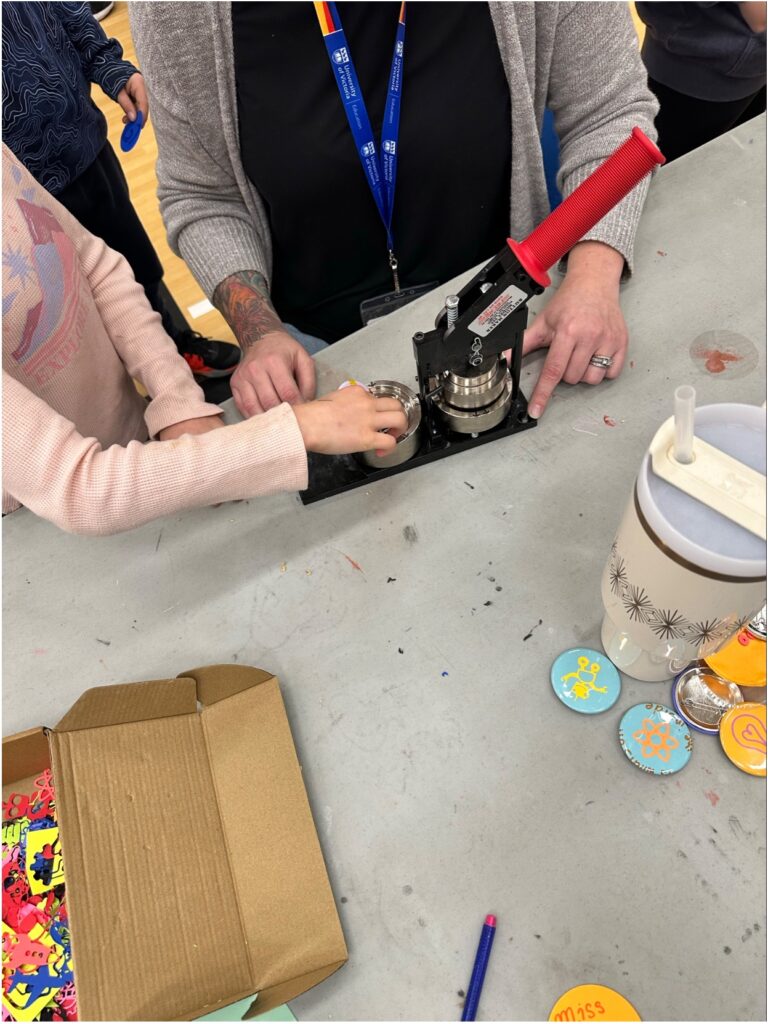
Taking place in the gymnasium, we set up five different stations for the event:

  1. Button making
  2. Go Cubes
  3. Microbit AI
  4. Chomp Saw
  5. Unplugged Activity: Brain in a Bag

GoCubes

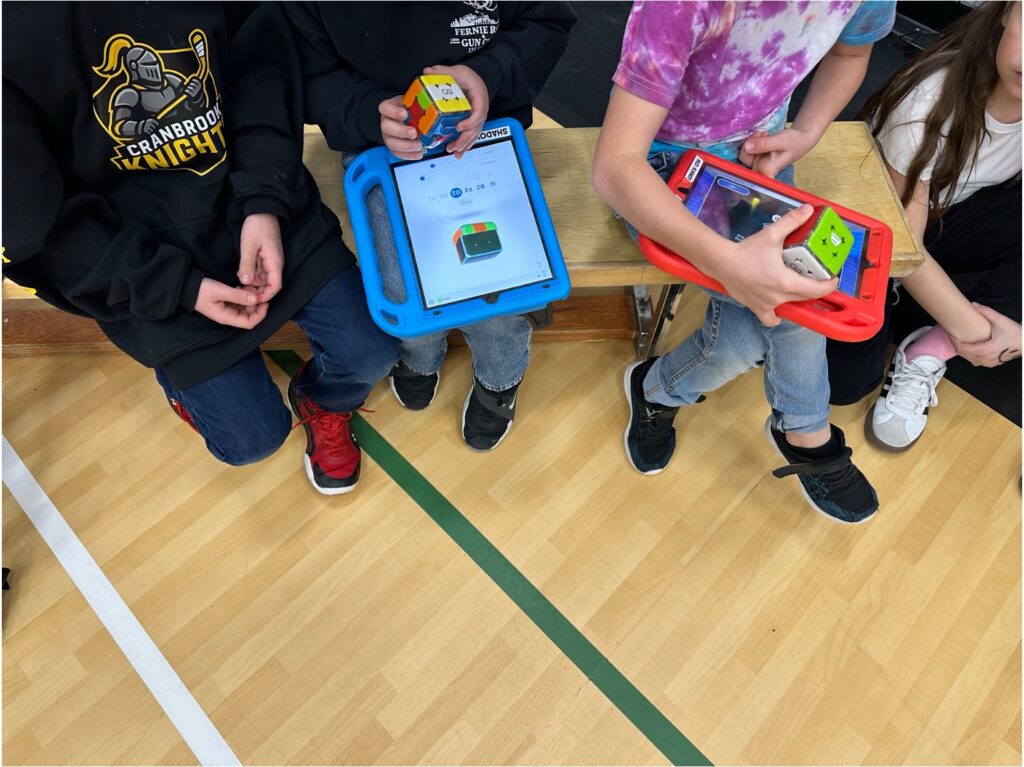
The first station I facilitated was the Go Cubes, which are electronic and bluetooth Rubik’s cubes that connect to a mobile app designed to help the player solve the puzzle and play interactive games. The app has lessons, games, and even has new puzzles for you to try out. You can even connect with friends to compete in speed games against one another.

Setting up this station was a bit of a time-crunch. With 15 minutes to connect all of the cubes to their respective iPads and ensure the app’s digital cube matched the physical cube, we were racing to complete everything before our first group of 15 students.
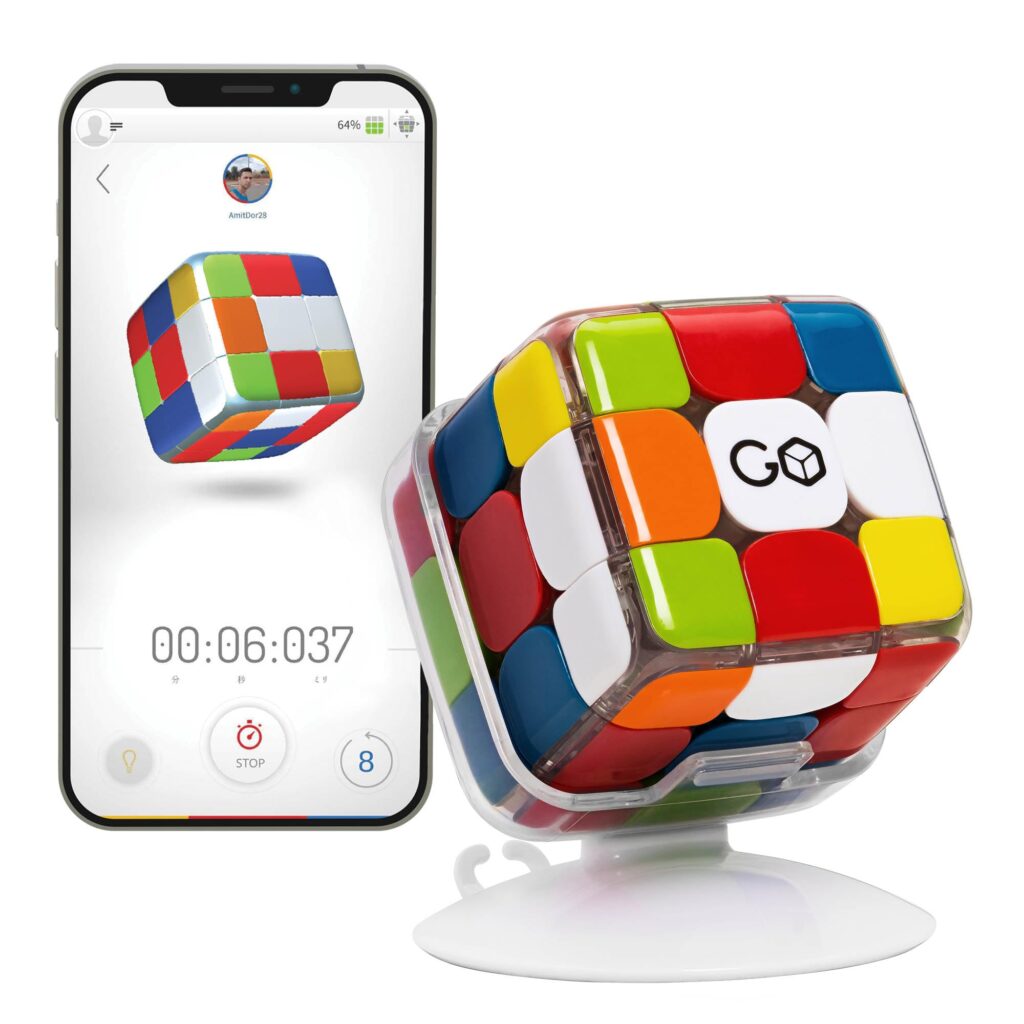
Source: Amazon.ca

One of the most important lessons to learn about becoming a teacher is the ability to think on your feet. With our first group of students excited and eager to explore the GoCubes, our team of EKTEP teacher candidates decided we could utilize this eagerness in having them help us configure all of the cubes. We turned a tedious task into an interactive lesson on collaborative problem-solving, giving students a chance to troubleshoot technology alongside us while keeping their curiosity and engagement at the centre of the experience.

Each group was given approximately 12 minutes at each station. With each group our team became a well-oiled machine; we introduced the cube, talked showed what a ‘solved’ cube looks like, and showed how the app on the iPad can help them solve it and play interactive games. Rubik’s cubes help students develop spatial awareness and problem-solving skills. Original non-electronic cubes can be extremely challenging to solve (I still haven’t figured it out!), which may cause some frustration in students. The GoCube can bridge this gap, providing students a guided lesson at their own pace.

ChompSaws

I was very excited to manage the next station: making cardboard airplanes with the ChompSaws. I spoke about this amazing tool in my previous post linked below. This station was a great hands-on experience for me to learn how to introduce the tool and inspire creativity in students.

We had three teacher candidates running this station. With a little extra time to prepare, we set up a game plan consisting of three substations, one for each teacher candidate to manage: tracing, drilling, and cutting. Because there were only six Chompsaws for groups of 12-15, we also added an area for colouring plane parts to keep students busy. Students were placed in pairs, sent to trace their parts first, either drill the holes or cut next, and finally assemble and colour the plane if there was time left.
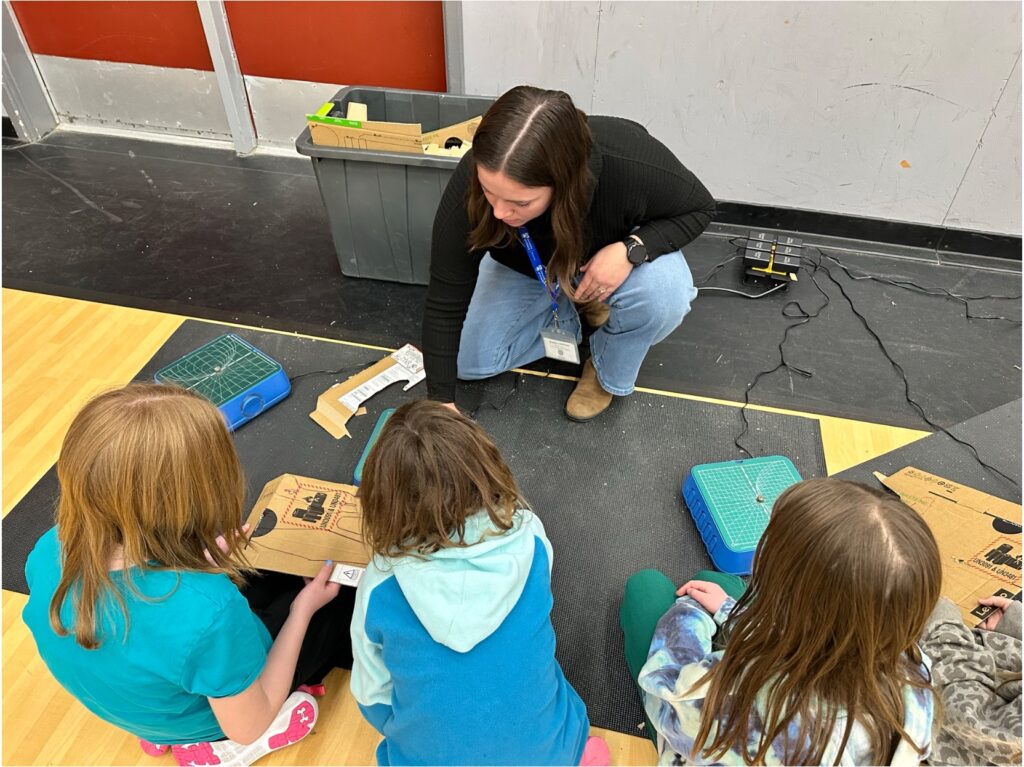
I really enjoyed this station. If I were to do it again, I would recommend having students spend at least 20 minutes at each station. I felt bad rushing through instructions, but I knew that if I didn’t, they wouldn’t get to see their finished product. Nonetheless, students seemed to enjoy the overall experience. Finished or not, students walked away excited and happy about the opportunity to use the Chompsaws.

I think Chompsaws are a great way to inspire students and give them a glimpse into the career of carpentry. Crafting an object or piece of art with your hands provides a sense of satisfaction that is hard to describe. Having opportunities like this event can help students see real-world applications for their creativity.

Key Takeaways

The Hour of Innovation event was such a fun experience for the students. The gym was teeming with excitement, joy, and laughter. In the future, I hope all schools in SD5 will get the opportunity to have this event at their respective locations. I also recommend finding a way to lengthen the amount of time. Perhaps this could take place over the course of a week, having classes come in to spend 30 minutes to an hour exploring each of the activities. I feel that this extra time would allow for a well-rounded learning experience, ensuring connections are made to the BC Curriculum. For example, with the Chompsaws, it would be fun to allow students to design their own planes. They would learn about weight distribution requirements and figure out what exactly makes a plane fly through prototyping and experimentation.


Weekly Reflection 9: SD5 Design Lab

For this week’s class, we had the opportunity to visit the School District 5 Design Lab located at one of the local elementary schools. The instructor explained the idea behind Transformative Learning and Technology, which seeks to build creative and critical thinking through hands-on, inquiry-led processes using digital tools.

One device that was shown to us that I loved was called a Chompsaw, which is a kid-friendly and kid-safe power tool specifically designed to cut cardboard (not fingers!). Watching the instructor demonstrate its capabilities and safeguards made me think of so many different ways this could be used in the classroom. Regardless, I think it is a great way to foster creativity. I would have loved one of these as a kid! Their website features so many different lesson and activity ideas, ranging from building and designing a hat, making 3-dimensional shapes, to making a racetrack for toy cars and making a crane.

The Design Lab had other resources like Cricuts, digital Rubik’s cubes, robotic hand sensors, green screen for video creation and editing, and an assortment of legos. I was unsure about the digital Rubik’s cube, initially thinking that the online feature would defeat the purpose of the puzzle. After some digging, I see that it won’t necessarily just give you the answer. Rather, the online features can provide lessons and tutorials for figuring out how to solve the cube on your own. Very cool!

It is amazing how many different things you can do with a Cricut device. I instantly saw the potential behind making one-of-a-kind classroom decor that saves time and looks professional. We created buttons by designing the logo on the Cricut app, cutting it out on card stock, and using the design lab’s button pressor.

There were many different Lego kits, including one where students are tasked with creating a gondola that transports their lego figurines from one side of a lake to the other. I think Legos are an engaging and fun way to make ADST and hands-on. The Lego kits encourage teamwork, creative thinking, and persistence through the process of inquiry, ideation, prototyping, testing, and refining.

Visiting the SD5 Design Lab was an enriching and exciting experience. I am looking forward to taking my future classroom there, as I can see how engaging and fun this resource can be. Not only this, I see it as a way to foster creativity and inspire students to think outside of the box. One of the common ideologies that has been reverberated within EKTEP is the need for experiential learning, or “learning by doing”. I think the Design Lab embodies this mindset, allowing students to become designers, testers, creators, and problem-solvers.

Weekly Reflection 8: Education Technology Presentations

In Class nine, groups presented on their Education Technology inquiry projects. Apart from our own presentation on Virtual Field Trips, topics ranged from digital literacy, high tech vs. low tech, to technologies designed for security and surveillance purposes.

After our group presented, the next group discussed developing digital literacy for both the teacher and the learner. More specifically, they wanted to explore how it tied into social-emotional learning (SEL). A common theme across all of the presentations today was intentionality, and this was applicable here, too. The presenters discussed how incorporating technology into SEL needs to be purposeful when used in the classroom. Moreover, building internet awareness was stressed, especially during a time of artificial intelligence and virtual access to content of all shapes and sizes…

The third group compared high tech and low tech in the classroom, and discussed their pros and cons. Low tech includes items like visual timers and noise-cancelling headphones. I see myself incorporating low tech tools like these into my future classroom, as they are an easy way to encourage UDL and accessibility. High tech also has many benefits, including individualized asynchronous learning and high levels of engagement. Examples of high tech include virtual learning resources like Prodigy Math and Scratch. I see myself giving these resources a shot, but I’m hesitant to make them a reoccurring activity. Ultimately, it will depend on my class’ specific needs, capabilities, and what learning styles they most prefer.

The fourth group of presenters discussed how to use technology as a bridge rather than a barrier. They mentioned the importance of recognizing not only the increased average amount of screen time at home, but also the fact that the digital divide has become larger. I think using technology as a bridge means to supplement hands-on learning and experiences. It should not be a replacement, and done with intentionality rather than convenience. Something I found interesting that this group brought up was a condition called rapid eye movement fatigue, which can happen with overstimulating technologies. This is another reason I intent to use high tech devices sparingly, as I think we need to be mindful of when technology crosses the line from supportive to overwhelming.

The final group discussed finding the balance between security and privacy for school surveillance systems and technologies. This middle ground is hard to pinpoint, and the answer is subjective. It reminds me of Edward Snowden when he leaked classified documents showing that the NSA had been spying and collecting data on global citizens. Some viewed this Espionage (including the U.S. government), and others saw him as a hero; revealing the truth and validating a right to privacy.

This group also discussed emergency communication applications that families and students can utilize to contact emergency services in the event of an emergency. I think these are great for relaying information in a quick, efficient manner that also may serve to be discreet. My only concern would be to inquire whether these apps are tracking your location, and what they do with your data (i.e., are they selling it to third parties?).

All groups brought interesting points to the topic of educational technology. I appreciated how each group highlighted both the strengths and the challenges of incorporating technology into the classroom. My key takeaways are as follows:

  1. Be intentional with what you use, how you use it, and when. Technology should not replace hands-on experiences, it should support it and bridge gaps in understanding.
  2. Understand the impacts and potential implications of the digital divide. Students will have varying degrees of usage, knowledge, and comfortability with certain technologies you have in your classroom.
  3. Technology can be an easy way to implement Universal Designs for Learning. Whether it is a pair of noise-cancelling headphones, a visual timer, or an immersive virtual reality field trip, technology can open so many doors for students with accessibility and/or cognitive impairments. These not only will foster a sense of inclusion in your classroom, but they can save time and stress for the teacher as well.

Overall, these presentations reinforced the importance of using technology with purpose, care, and an understanding of students’ diverse needs.

Weekly Reflection 7: Generative AI in Education: To Use or Not to Use?

There has been a remarkable shift in society’s use of the internet. With the publication and expansion of A.I. models like generative AI and large language models (LLM), educators are faced with a new decision on how to incorporate, or ban, its use in the classroom. Some view AI as a tool, whereas others fear its effects on critical and creative thinking. In this week’s reflection, I will be outlining my own views on where, when, and how to use Generative A.I. and LLMs ethically and responsibly in the classroom.

What is it?

Generative Artificial Intelligence is tool that can generate new content such as text, images, and videos. An example of this is ChatGPT, which can generate an output based on extraction of multiple different internet resources. The more the source is used, the more ‘accurate’ it becomes. This does not mean ChatGPT is never wrong; the system is extracting data from human-generated content and cannot decipher factual from fictional. That means as an educator, we must be critical of the content that Gen A.I. platforms create and teach our students how to do the same.

When Should I Use it?

According to the School District No. 5 policies surrounding the use of Artificial Intelligence within schools, all staff should adequately train and educate themselves in the tool before attempting to use it. EKTEP recently facilitated a workshop on the use of AI which I found to be extremely informative. We discussed ethical uses, common assumptions and/or fallacies about AI, as well as its benefits in the classroom.

Developing an understanding of how AI platforms like Large Language Models (LLMs) work can take time and some effort. What is most important is to understand that these programs are not 100% accurate. These models accumulate and gather data from human-entered resources. That means that it too can be very susceptible to giving misinformation.

Source: AI Literacy for Educators powerpoint presentation

Using AI should serve as either a collaborative or supplemental process, not a replacement of your responsibilities. For example, asking ChatGPT to write a paper on the Industrial Revolution is replacing all of the critical thinking and reflective processes you would be expected to do. Instead of asking the model to write your paper, you could perhaps ask the program to find reputable resources that cover this topic. That being said, you must do your due diligence of vetting all answers it gives to you. This has also been outlined in the SD5 policy.

Screenshot of ChatGPT prompt example and answer

Using AI should not be used to replace a challenge. In fact, pursuing, overcoming, and achieving challenges is a vital and important part of our personal growth. What this means is we must find balance between limited thinking/low stress and instances causing a high cognitive over-load.

How can we stay open to the discomfort of learning, rather than using AI to smooth it away too quickly?Kelly Fyke, AI Literacy for Educators Presentation

Why Should I learn about AI?

Whether we like it or not, AI is here to stay. Programs are becoming faster, more powerful, and are creating content that is sounding more and more human-like. Its features can be tempting to use as more than a tool but a complete crutch for any challenge that is thrown our way. That means it is important to learn not only for ourselves on how to use it in an appropriate and ethical manner, but to teach our students to do the same.

  1. Show students that AI can make mistakes.
Source: AI Literacy for Educators Presentation

Here we see an inaccurate map of Canada created by ChatGPT-5. This would be a great example to show to a group of students to reveal that even the most up-to-date AI models can make very silly mistakes. You can also make this into a hands-on learning opportunity, where you ask the students to see if they can ‘trick’ AI. For example, you can ask AI to explain a made-up theory and see what answer it provides.

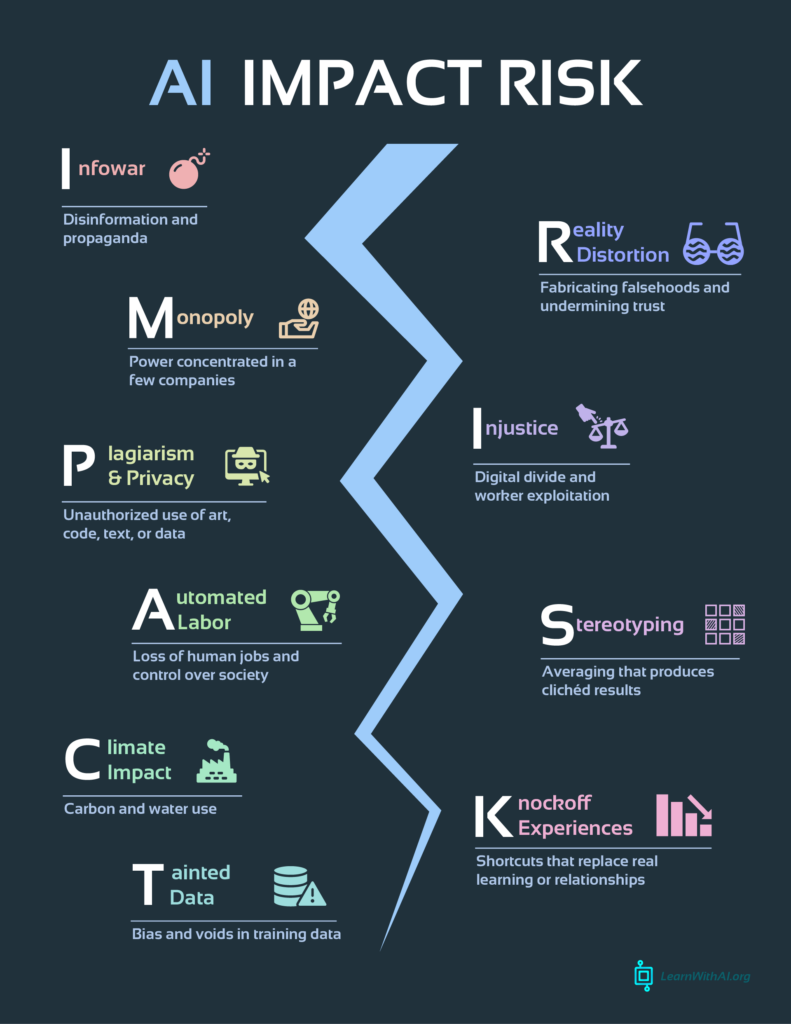
2. Have a discussion on the risks and impacts

Source: ai-impact-rick.com

AI has many benefits as well as many risks. Take a moment to reflect on these with your students. Provide real-world examples, and ask students what they have heard or seen. This is not intended to scare them away from using this resource. Rather, the purpose is to ensure every person is informed and educated on how AI programs operate.

3. Show the opportunity

For our group inquiry assignment, our team researched virtual field trips, which is a virtual, immersive, and interactive way to explore space, time, and different geographical locations without ever stepping foot outside of the classroom. This opens so many doors for students whose opportunities to participate in field trips were hindered by accessibility requirements, language barriers, or financial reasons.

Weekly Reflection 6: Gamification in the Classroom

Gamification refers to “the integration of game elements like point systems, leaderboards, badges, or other elements related to games into “conventional” learning activities in order to increase engagement and motivation.” This is a great way to increase motivation, provide sequential feedback, and even provide more individualized challenges for students to tackle.

When we play games, our brains produce a powerful neurotransmitter called dopamine, which is the root of our feelings of pleasure. Generally speaking, this neurotransmitter is heightened when we achieve a goal by overcoming some sort of challenge. Willis in their article describes this as “no pain, no gain”. Studies have also shown that dopamine levels have a direct connection with our memory retrieval systems and performance. This means that by incorporating games into the way we teach, we can help students learn and master content without them even realizing it.

Music

There are so many different ways you can turn your music lesson into a fun and interactive game. The first idea that came to my mind is called Boomwackers, which are colourful PVC pipes of varying length that when hit, give off a distinct and specific note. I came across a video of a class using these to play ‘Guitar Hero’, which is a visual and interactive rhythm game. This can help student develop a sense of rhythm, beat, and pitch.

Mathematics

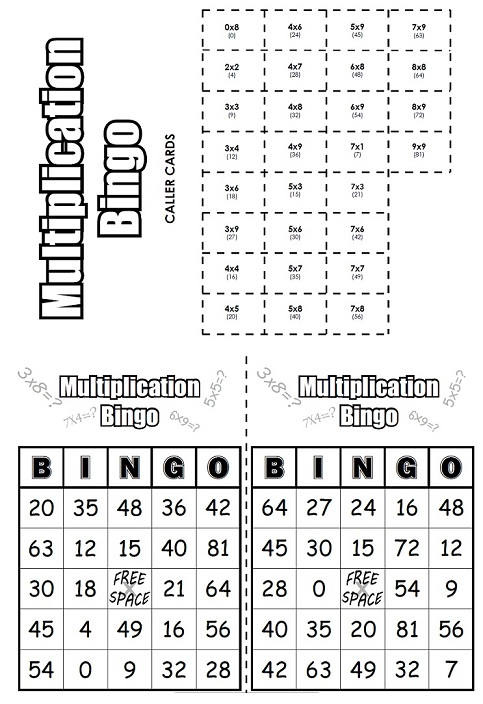
Mathematics has been a subject that quite often brings stress and anxiety for many students. We as educators can help to reduce these feelings through practice and hands-on learning methods. Turing practice into games can help students develop their number sense without them even realizing it. One example of this I found to be very engaging for student is called Multiplication Bingo. This idea can be modified for multiple grade levels, depending on what you are focusing on (addition, multiplication, subtraction, division, etc.).

One of the games that helped me develop my number sense was Cribbage. Cribbage is a 2 or 3-player game with the objective to be the first to score 120 points. Points are scored from the cards that are randomly drawn to your hand of six cards. Numbers that add up to 15 are worth two points, as are pairs. Runs (like 1,2,3 or 7,8,9) are assigned points based on how many numbers there are in the sequence. It can be tricky to learn at first, but once you get the hang of it, it is so much fun!

English Language Arts

Last year in my Literacy course we had many wonderful opportunities to bring our ideas into the classroom. One of the games I created for developing phonemic and phonological awareness in a Kindergarten class was to use Letter Mazes. Students were tasked with navigating the maze by identifying the picture that matched the letter at the top of the sheet. For example, here a student is looking for images that start with the letter ‘C’ to form a pathway to the bottom of the maze.

Science

During my time in the Nass Valley, I taught Grade 8 Science and Social Studies. For our Science class, we did test reviews by playing Jeopardy. I purchased an editable Jeopardy template from Teachers Pay Teachers and filled in the categories to match the content we had been learning about. For example, our final unit was Earth Sciences. Questions were a combination of true and false, fill in the blank, and multiple choice. Students would be divided into teams of four or five. It made me happy to see how excited they would become once I pulled up the Jeopardy game. It seemed to really help them with recall and retention of previously learned information.

Source: Jeopardy Powerpoint Template from TPT

Weekly Reflection 4: Graphic Design and Creation

Digital literacy is becoming more and more essential as we progress through this new age of technology and AI. I remember going through my elementary years and not touching a single computer at school until grade 6 when we learned how to type. During our various in-situs in our courses, I have seen students as early as kindergarten working with devices like iPads. Whether we like it or not, many students will be exposed to a from of technology from a very early age. Our responsibility as educators is to teach them how to use it as a tool for learning, as learning, and of learning.

During my six-week practicum in a grade 3 class, we helped students develop their typing and Microsoft office knowledge through the incorporation of Microsoft Word. Students learned how to login, locate the application, and how to format a paragraph. Many of these skills become almost unconscious to an adult after multiple years of practice. The COVID-19 pandemic was revealing to the educational community in the sense that we must develop this skills from an early age.

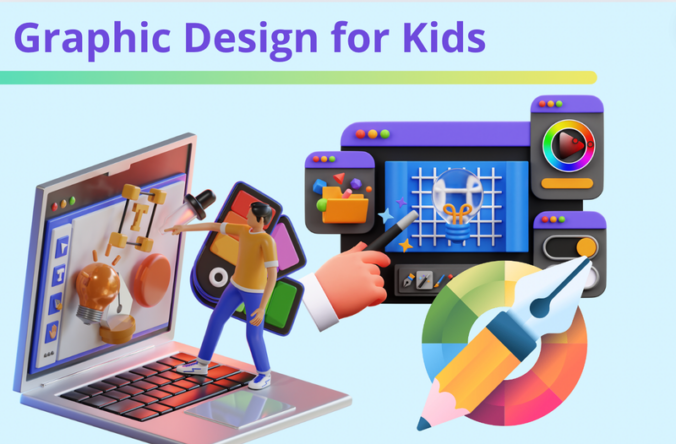
Along with developing skills in Microsoft office applications such as Word, PowerPoint, and Excel, introducing resources like Canva can help students create an array of graphic representations of their learning. For example, Canva’s platform allows me to create videos, posters, presentations, worksheets, and even websites. This can be applied to multiple different grade levels and scaled to suit the student’s needs and abilities. Create-US offers an overview on how to introduce Canva and develop skills for using it for kids.

Here is a video you can show in your classroom to introduce Canva.

Other Resources

There are tons of online resources available to help students design their own graphic. Providing them access to these tools will allow them to use them in a way that suits their individual needs. Here are a few other resources that haven’t already been mentioned:

  1. Pexels has millions of different stock photos that takes away the extra step of ensuring we are following licensing guidelines. When I look for images for my blog posts, I must ensure the image is properly sourced and is distributable. A quick search on Pexels with the prompt ‘graphic design’ provided lots of different visuals I can incorporate.

2. WordPress is a great way for students to showcase their learning in the creation of a website. During my experience navigating WordPress, I would recommend providing an extensive tutorial on how to use the website, as it is not the most intuitive of platforms.

3. Scratch

Scratch is a free resource available for kids to learn the basics of coding. It is very interactive, allowing students to design their own animations.

Assignment 2: Virtual Field Trips with a UDL Lens

For our group project this semester, our team chose to look at virtual field trips, and how they can contribute to a Universal Design for Learning in a meaningful and authentic way. We directed our research with the following inquiry question in mind:

How can virtual field trips enhance accessibility and engagement for elementary students with diverse learning needs?

We chose this topic because UDL and accessibility in the classroom are topics which matter to each of us a great deal. We discussed field trips we had gone on as elementary students ourselves, and the financial, physical, or logistical barriers they posed. For example, my history class in high school hosted an annual ‘Visit History’ international trip, going to different historical sites in Europe. For those who financially could not afford this or had mobility issues this amazing opportunity was not possible. The amazing thing with Virtual Field Trips (hereinafter VFTs) is that you can travel across both space and time. The world is at your fingertips!

For our digital artifact, each group member did a screencast looking at a different aspect of VFTs. Here we can find our first group member walking you through the process of creating your very own interactive virtual field trip:

Our next group member chose to discuss how to use a specific resource called ThingLink to take your students on immersive 360º-view virtual tours:

I chose to do a screencast on a specific VFT experience, providing an idea for the wide range of opportunities this type of technology can provide. I found a free resource from BBC’s Learning Hub that provides an interactive field trip into the world of dinosaurs! Here is the link to the video.

How does this relate to teaching and learning?

I find VFTs are a great way to get students to engage and interact with content in a fun and immersive way. They also allow for asynchronous learning, meaning that each student can use the resource in a way that best suits them. This gives students autonomy over what they want to learn, and how. It also makes learning more inclusive, as it overcomes financial, physical, and geographical barriers. Not only do VFTs tackle these barriers, but they easily incorporate accessibility features, such as subtitles for auditory impairments or ELL, visual modifications, and audio features.

What are the pros, cons, and risks?

As noted above, the number one pro we identified with VFTs of all types is its inclusivity. If your district has reliable internet access, there are many free resources online that you can utilize to enhance learning in your classroom for all students.

A con we identified is that some VFTs like virtual reality equipment can have high upfront costs. Virtual Reality headsets can offer a more immersive experience for students, but are quite expensive. According to PC Mag, VR headsets can range in price from $200 to well over $1500. Buying multiples of these for a school would certainly add up.

There are some potential risks associated with this type of technology, as there are with many other forms. For example, repeated use or use for long periods of time can potentially become quite disorientating- leading to symptoms of motion sickness. Additionally, VR headsets are still quite new, meaning we still do not know how it affects our brains and its development.

Strategies and Best Practices

Before embarking on your virtual field trip journey with your class, ensure you understand the technology well enough to teach your students how to use it. Make sure to select or design a VFT with intentionality; this should aim to foster curiosity or contribute meaningfully to student learning.

During the VFT, we recommend combining guided exploration with student choice. Ensure they are on the right track with what they are expected to know, but also allow students to follow their own wonders and interests.

After the virtual field trip, ask students to reflect on the experience. This can be in the form of writing a short reflective paragraph, making a poster about what they have learned, or sharing their thoughts with their peers in a class discussion.

As a future teacher, I am excited for the opportunity to use resources like VFTs. I think they are a powerful way to make learning accessible, meaningful, and fun for every student.

Weekly Reflection 5: A Discussion on ‘Take Me Outside Day’

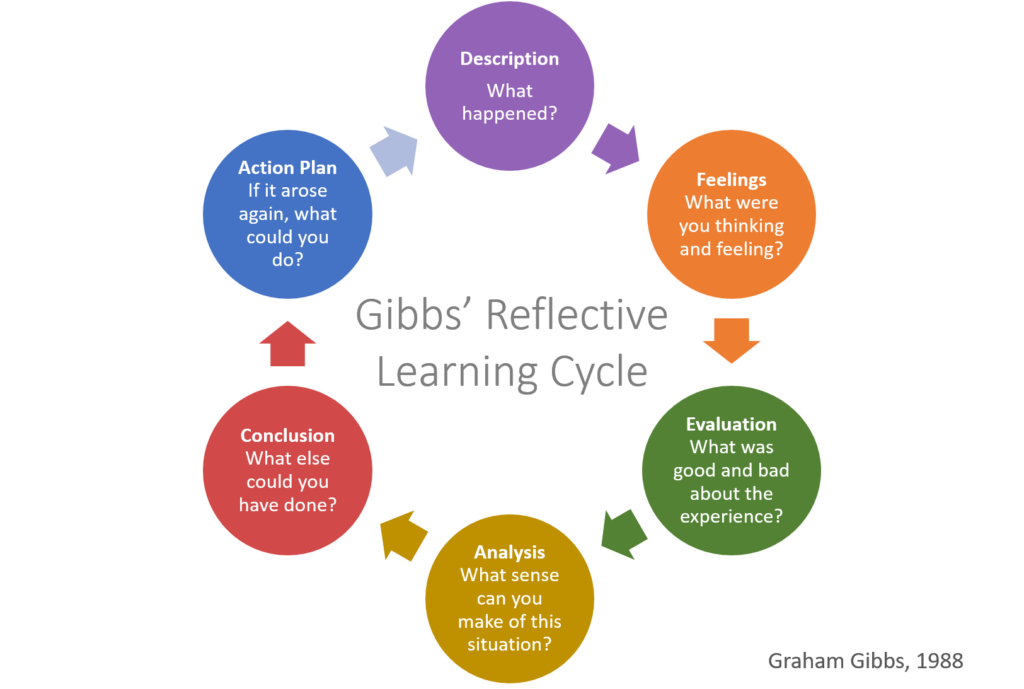
For this week’s class we had an In-situ experience with one of the elementary schools. It was ‘Take me Outside Day’; a great excuse to get the kids out of the classroom for some experiential learning at a nearby park! For my reflection, I will be using the Gibb’s reflective cycle.

Image from https://helendenheld.com/tag/gibbs-reflective-learning-cycle/

Description: What happened?

The focus of this in-situ was to incorporate technology into place-based experiential learning. Students read The Leaf Man by Lois Ehlert, which tells a story about a character made of autumn leaves who is swept away and carried by the wind through various places, including marshes, orchards, and prairies.

We walked to Elizabeth Lake Park with the students along with an iPad per group of three to four. The iPad was to be primarily used for the app ‘Chatterbox Kids‘, which is an interactive app that allows students to animate pictures they take to make them talk.

We started with a nature scavenger hunt to get the kids paying attention and becoming fully immersed in their environment. It was so much fun!

Feelings: what were you thinking and feeling?

During our walk to the park, I felt very happy to be outside. It was a little breezy but it was wonderful seeing the autumn leaves swirling in the wind along with the spooky halloween decorations set up in passing yards. The park wasn’t very busy, given it was a weekday in the middle of the afternoon. It was so nice having such a beautiful place essentially to ourselves. It filled my heart with joy to see how excited the students in my group became about conducting a scavenger hunt. They worked very well together and did an exceptional job of taking turns and assuming responsibilities.

Evaluation: what was good and bad about the experience?

I think anytime spent outside is so important for us, especially kids. We spend so much time indoors looking at computers, phones, or television screens. It’s nice to get a break away from this! I think the scavenger hunt was a great way to get students moving, exploring, and reconnecting with the world around them.

I found the implementation of Chatterbox to be somewhat lacking, unfortunately. The students had a lot of fun with it, but I’m struggling to see the intention behind its incorporation. It did foster a sense of curiosity and amusement in our group, but I found it to take away from the experience of being outdoors.

Analysis: what do I make of this situation?

When possible, taking learning outside can foster wonder and curiosity. This helps students apply and synthesize their learning from inside the classroom to the world around them. Our time in the park allowed students to get moving, collaborate with one another, and enjoy a beautiful day. Research has shown that spending time outside in nature helps to reduce feelings of stress, anxiety, and depression. Encouraging healthy habits like spending time outdoors with elementary students is a great way to promote lifelong wellbeing.

Conclusion: what else could we have done?

Here are some possible activities with the book The Leaf Man that could be utilized outdoors:

  • Have students create a leaf figure and write a short story about them. Share with peers with a gallery walk at the park.
  • Sensory nature walk: have students record something they see, smell, hear, and feel.
  • Have students create collages out of leaves, rocks, twigs, etc with a focus on symmetry and multiple colours.

Action Plan: what next?

For my future classroom I intend to take students outside on a regular basis. I find this is a great was to incorporate hands-on learning along with practicing being present in our lives. We live in an age where so many of us are constantly thinking about what is next. Simply going on a walk or sitting outside can reconnect us back to the present and with one another.

Final Thoughts on my Free Inquiry Project

With our Free Inquiry projects coming to an end, I’ve been reflecting on what this project has taught me, both explicitly and implicitly. I chose sourdough bread-making as my Free Inquiry project because cooking and making things with my hands has always been a passion of mine. I find beauty in life’s simple things. But when you look at its expansive history as well as under the microscope, bread is anything but!

I have always enjoyed learning about my teacher’s interests and passions. You can tell right away when an instructor is passionate about the subject they teach (or apathetic). Another reason I chose bread-making is because I wanted to challenge myself to think of ways to apply this cross-curricularly in a classroom setting. Simply put, how can I incorporate something I am passionate about to instil curiosity and wonder in my students? How can I share the beauty of life and our world through something we can all connect through? On the surface, I knew math and science could be applied to the art of bread-making, but what really fascinated me in my inquiries was the history and cultural aspects of it. For example, I did not know bannock originated in Scotland. I have always loved bannock. It reminds me of yuwks (Nisga’a for cultural feasts) and school lunches at Nisga’a Elementary/Secondary School. When I found out about its colonial roots, I felt conflicted. How can a bread that is still eaten today in many indigenous communities have such a dark history?

Like many things in our society, the significance and perspectives we assign to certain objects evolve throughout time. For some communities, bannock is not eaten, and that is okay- that is their choice. For others, they feel bannock is a symbol of resilience and survival. Without this bread, many more indigenous peoples who had been forced onto reservations would have certainly starved to death.

This Free Inquiry Project was helpful to me on so many levels. I’m proud of myself for learning a new skill, and it is a hobby that will help me be more present in my day-to-day life. The process of growing your own yeast and cultures through sourdough starter, the stretches and folds of fresh dough, and the patience required throughout it all helped me slow down and take a breath. In a fast-paced world where everyone is thinking about what is next, I find these times of introspection comforting for the mind, body, and soul.

While my Free Inquiry project for EDCI 336 may be coming to a close, I am certainly not finished learning about the world of sourdough making. I have bookmarked multiple recipes I would like to try, including an olive and rosemary bread, and many different starter discard recipes. For those who are interested, I will include some hyperlinks below!

Understanding the Social, Cultural, and Oppressive Aspects of Bread

Source: ohnmarwin.com

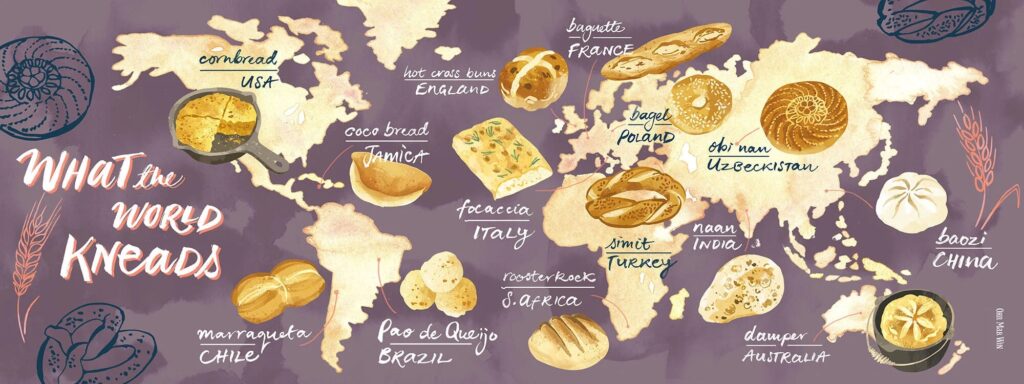
By connecting everyday food to Social Studies, students can explore historical, cultural, and shared values across the world. From the grains that helped shape ancient civilizations to the artistry that transformed the loaf, bread making can foster curiosity and cross-curricular thinking.

From the BC Curriculum:

  • Core Competency:
    • Personal and Social Responsibility: Understanding food sources, sustainability, and cultural respect.
  • Social Studies:
    • Big Idea: Canada’s policies and treatment of minority peoples have negative and positive legacies.
    • Curricular Competencies:
      • Use inquiry to understand historical and cultural perspectives on food
      • Sequence objects, images, and events, and recognize the positive and negative aspects of continuities and changes in the past and present
      • Evaluate and explain the significance of grain resources in shaping communities and trade.

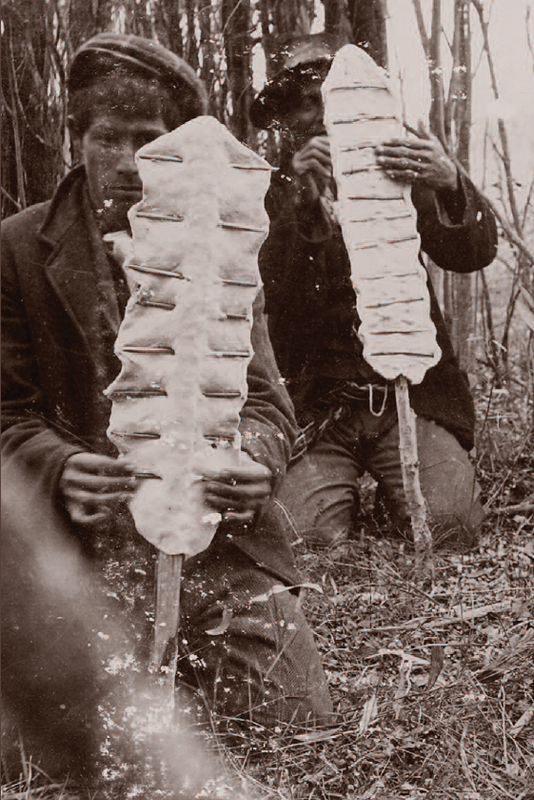
During my research, I wanted to explore a popular bread type that has been connected to many Indigenous cultures and communities within Canada: Bannock. To my surprise, bannock’s roots actually originate from Scotland, and was introduced to Indigenous peoples by colonizers during the 18th and 19th centuries.

Source: Alaska Ethnobotony Circa 1900, Saskatchewan

When Indigenous peoples were forced off of their native lands and on to reservations, they lost many vital food sources they had relied on for thousands of years. Those living on reservations were supplied with food rations, many of which were completely foreign to them. Due to this, bannock was made in order to avoid starvation.

Bannock was not the first bread to be eaten by Indigenous peoples of North America. Before bannock, some nations created flatbreads similar to tortillas from the starch and flour of bracken rhizomes (underground stems of ferns). Today, many Indigenous cultural events such as powwows, feasts, and community gatherings will have bannock. Indigenous-owned restaurants will often feature this bread on their menus. Its ties to colonization but modern applications make it a tricky subject, but one that is worth exploring with your students. For some Indigenous people, the making of Bannock can be empowering, as it represents resilience and survival.

“Bannock was what we had to eat, but now I want to pay homage to the dignity of our women who have learned to turn a negative into a positive” – Emilee Gilpin

« Older posts